
Your 50.59s,
cited and drafted.
Regulatory AI works a proposed change through 10 CFR 50.59 applicability, screening and the eight evaluation criteria against your UFSAR and tech specs. A separate agent challenges every answer, and the report is drafted in Word for the licensing engineer to review.
- Works from your UFSAR and tech specs
- Single-tenant, hosted by Nuclearn
- Signs in with your company's SSO
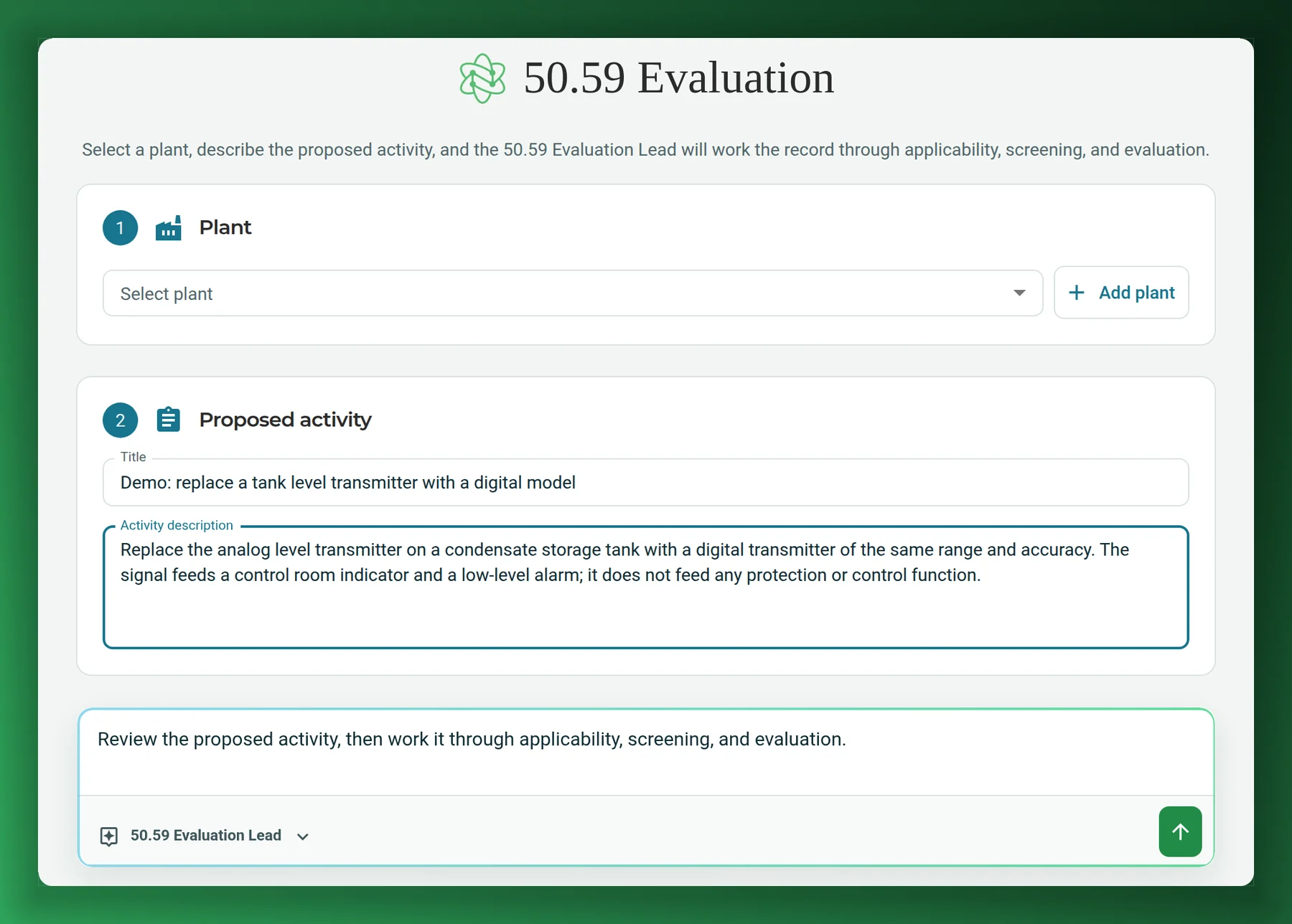
Screenshots on this page show Regulatory AI as it is today, with a generic demo activity and no plant data.
- Backed by NuclearnAI software built for nuclear plants since 2021
- Over 70 facilitiesNuclearn products serve sites in North America and the U.K.
- ISO/IEC 27001:2022Certified information security management
The change in front of you, taken through 50.59.
Bring a proposed activity. Regulatory AI works out whether 50.59 applies, screens it, evaluates it against the eight criteria when it screens in, and writes every answer down with its sources.
Changes to the facility
A modification to the plant as the UFSAR describes it, screened and, where it screens in, evaluated against the eight criteria, with the basis for every answer.
See the workflow →Changes to procedures
A change to a procedure described in the UFSAR, taken through the same screening questions.
Methods of evaluation
A change to a method of evaluation described in the UFSAR, which 50.59 screens on its own question.
Tests and experiments
A test or experiment not described in the UFSAR, screened like any other activity.
Screened out, recorded too
When 50.59 doesn't apply or the change screens out, that determination is recorded with its basis, the same as a full evaluation.
Revisions after your review
Reopen a completed record with a reason. It has to pass a fresh challenge and produces a new report.
Every determination needs its basis, in writing.
Under 10 CFR 50.59, a change made without a license amendment needs a record with a written evaluation that gives the basis for that determination.1 Building that basis means reading the UFSAR, the tech specs, prior evaluations and the guidance, then writing it up so a reviewer can follow it.
Records of facility changes are kept until the license is terminated,1 so the write-up has to stand on its own years later. The licensing engineers who know where to look are usually the ones with the least time.
Regulatory AI starts from the licensing basis you already have.
Accident and malfunction frequency, likelihood and consequences, new types of accident or malfunction, fission product barrier limits and methods of evaluation.
Each report briefly describes the changes, tests and experiments, with a summary of the evaluation of each.
Requirements of 10 CFR 50.59, not Nuclearn figures. Source at the foot of the page.
Three steps from the activity to the record
No new system of record. Regulatory AI works from the plant documents you load into the Nuclearn platform.
Set up the plant's library
Link the plant's UFSAR and tech specs, plus its design basis, prior 50.59 evaluations, procedures and licensing correspondence if you have them. Candidate datasets are proposed to you to confirm before they are linked.
Describe the activity
Pick the plant, give the activity a title and a description, and start. The 50.59 Evaluation Lead takes it from applicability onward.
Review the record
Each answer lands on the record with its citations. Download the Word report, run a verification, and reopen the record if your review calls for changes.
From applicability to a drafted report.
Regulatory AI follows the structure of NEI 96-07, the industry guidance NRC Regulatory Guide 1.187 endorses: applicability, then screening, then evaluation. Each answer is researched in the plant's licensing basis and cited, and a separate agent challenges the work before the report is finalized.
Regulatory AI assembles the basis and drafts the evaluation. The licensing engineer reviews the record and owns the determination.
Every answer on one record.
As the agents work, the record panel beside the conversation fills in: the applicability determination, the four screening questions, the eight criteria, the challenge result and the report.
Whether 50.59 governs the activity, with the basis.
Q1 Facility change · Q2 Procedure change · Q3 Methods of evaluation · Q4 Test or experiment, each YES or NO with its basis.
One answer per criterion, cited to the plant's UFSAR and tech specs.
Independent Challenge: PASSEDDownload reportRun verificationIllustration using the panel's own section labels. A real record cites your plant's documents.
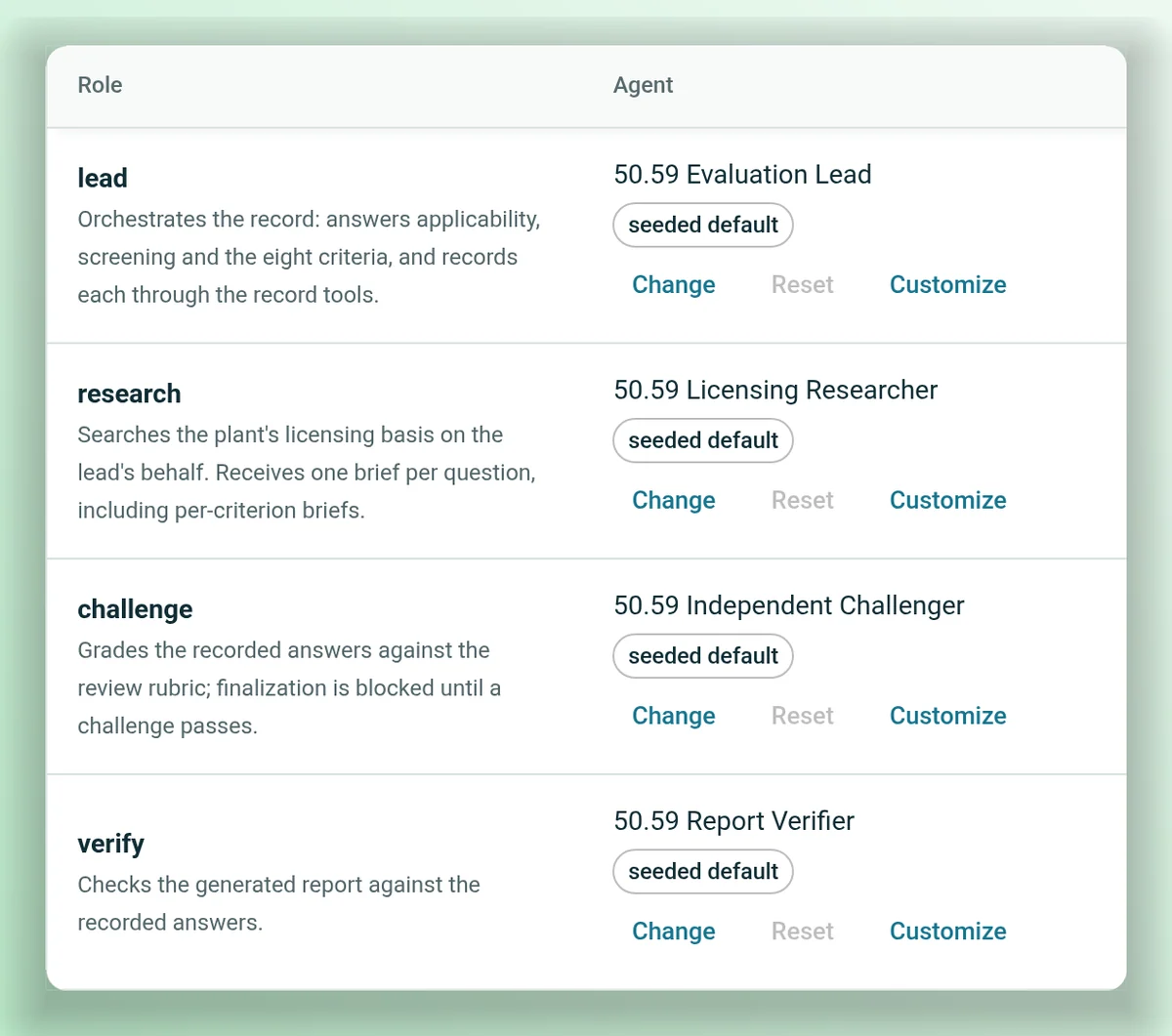
Administrators can choose which agent fills each role. The steps each role follows stay the same.
Made for the way 50.59s are reviewed
Sources beside the record
The 50.59 conversation keeps a Sources panel next to the record, listing what was searched, read and cited.
Your own references
UFSAR and tech specs are required. Design basis, prior 50.59s, procedures and correspondence are optional.
50.59 History
Your recent 50.59 reviews, a click from the start page.
Asks before it links
Setting up a plant, the agent proposes datasets and you confirm them before they join the library.
Set up once per plant
Register the plant and its references once, and every review for that plant starts from them.
More licensing workflows
Regulatory AI also includes workflows for searching NRC ADAMS, finding the Regulatory Guides that apply to a question, and screening an event against NRC reportability criteria.
In Nuclearn's datacenter.
Scoped to each person.
Regulatory AI runs on the Nuclearn platform, in Nuclearn's own datacenter on Nuclearn's hardware, with the same sign-in, documents and permissions.
Single-tenant, hosted by Nuclearn
Each plant gets its own instance, hosted by Nuclearn in our own datacenter on our own hardware. Azure Government or your own servers on request.
Built for 10 CFR Part 810
How Regulatory AI is hosted, operated and supported is set up for 10 CFR Part 810 export controls.
Your single sign-on
People sign in through your identity provider, such as Microsoft Entra ID, Okta or Ping, or with Active Directory.
Access per dataset
The licensing basis lives in datasets with their own permissions, and search stays within what each person may see.
Agents limited by design
Each agent can only use the tools it was given, and the 50.59 tools only load where the product is licensed.
A record of every review
Each answer, challenge and report is kept on the record, and a reopened record keeps the reason it was reopened.
A certified company
Nuclearn is ISO/IEC 27001:2022 certified.
What it is not
Regulatory AI doesn't make 50.59 determinations or decide whether a license amendment is needed. It assembles the basis and drafts the evaluation, with its sources, for the plant's qualified licensing engineers to review and decide on.
Questions licensing teams ask first
Does Regulatory AI make the 50.59 determination?
No. It researches the licensing basis, answers each question on the record with its citations, has a separate agent challenge those answers, and drafts the report. The licensing engineer reviews the record and owns the determination.
What does it need from us?
The plant's UFSAR and technical specifications, loaded as datasets on the Nuclearn platform. Design basis documents, prior 50.59 evaluations, procedures and licensing correspondence are optional and make the research more complete.
Which guidance does it follow?
The record follows NEI 96-07: applicability (section 4.1), screening (section 4.2) and evaluation (section 4.3), with the eight criteria from 10 CFR 50.59(c)(2). NRC Regulatory Guide 1.187 endorses NEI 96-07.
What happens if the change screens out?
The record ends there, with the applicability and screening answers and their basis written down, so a screened-out change is documented the same way as a full evaluation.
Can we change how it works?
Administrators can choose which agent fills each role in the workflow, such as the researcher or the challenger. The steps each role follows, and the gates before a report is finalized, stay the same.
Where does it run?
Each plant runs in its own single-tenant instance, hosted by Nuclearn in our own datacenter on our own hardware, with hosting, operations and support set up for 10 CFR Part 810 export controls. Azure Government or your own servers on request. People sign in through your company's single sign-on.
See a 50.59 worked through.
We'll take a demo activity through applicability, screening and evaluation, show the record, the challenge and the report, and answer your IT team's questions about deployment and sign-in.
- A live walkthrough with a demo activity
- Your questions on deployment, sign-in and data
- How it would fit your 50.59 process
Regulatory AI is backed by Nuclearn, whose products serve over 70 facilities in North America and the U.K.
Book a demo
Tell us a little about your site and we'll set up a time.
Thanks, we've got it.
We'll be in touch to set up a time. If it's urgent, email contact@nuclearn.ai.
Prefer email? contact@nuclearn.ai